Wednesday, December 25, 2019

Pitfalls of using Jupyter Notebook

Jupyter Notebook is no doubt providing an convenient interactive development environment for coding in Python. The deployment of it in theory is independent of the machine. However, when deployed on servers, especially the servers are hosted in IDC, several pitfalls should get noticed.

Since server might employ more strict rules, so not all ports are available. Usually port 22 is always available. When do local tunnelling, remember the host and port must be explicitly specified. Otherwise, it will fail.
The following is an example:

"C:\Program Files\PuTTY\putty.exe" -ssh username@server_url  -L localhost:local_port:localhost:remote_port

After that, notebook can be launched remotely. It's cunning to remember some options to the command to facilitate usage, such as the working directory, the port number, etc. Following is an example:

jupyter notebook --notebook-dir=working_directory --no-browser --port=remote_port

Wednesday, March 27, 2019

Another way to using Github

I usually just clone repo from Github, however today my friend shows me another way, here I just log it for later reference.

The first step is to make a folder to host the repo, like:
mkdir $HOME/scalable_agent

Then enter the folder to initialize the repo and link to the remote repo on github:
git init
git remote add origin https://github.com/deepmind/scalable_agent.git
git pull -v origin master

The next step is to create a branch to host your modification:
git checkout -b py3encondingIssue
vim py_process.py

After that, commit the change and push to the remote repo:
git add py_process.py
git commit -m "fixing the encoding issue of the name for class property"
git push -u origin py3encondingIssue

Happy coding!

Thursday, September 6, 2018

Solve the C++ library incompatibility problem when using matlab

I tend to mix the Python code and Matlab code together. The most convenient way is to expose the Matlab as a computation engine for Python. However Matlab comes up with itself specific version of standard C++ library which is probably incompatible with the system's one. The following way can overcome such conflict:

export LD_PRELOAD=/usr/local/matlab2016b/sys/os/glnxa64/libstdc++.so.6.0.20

Wednesday, July 18, 2018

A wrapper around batch_normalization

Usually I am using Sonnet, however recently an overlook of the document in-lined with source code made me thought there is a potential bug in the implementation. But when I turned to the implementation provided by TensorFlow, there is no better off. Lots of pitfalls here and there.

The following is a wrapper by me to demonstrate a user case of the routine, hope it will be useful. And I believe you know how to save and restore the variables, yes?

Enjoy coding no matter how frustrating.

import numpy as np
import tensorflow as tf
import sonnet as snt

from tensorflow.python.layers import normalization


class MyBatchNorm(object):
    def __init__(self):
        self._bn = normalization.BatchNormalization(axis = 1,
            epsilon = np.finfo(np.float32).eps, momentum = 0.9)

    def __call__(self, inputs, is_training = True, test_local_stats = False):
        outputs = self._bn(inputs, training = is_training)

        self._add_variable(self._bn.moving_mean)
        self._add_variable(self._bn.moving_variance)

        return outputs

    def _add_variable(self, var):
        if var not in tf.get_collection(tf.GraphKeys.MOVING_AVERAGE_VARIABLES):
            tf.add_to_collection(tf.GraphKeys.MOVING_AVERAGE_VARIABLES, var)

t = tf.truncated_normal([2, 4, 4, 2])


bn = MyBatchNorm()
bn2 = MyBatchNorm()

n = bn(t)
n2 = bn2(t)

update_ops = tf.get_collection(tf.GraphKeys.UPDATE_OPS)
with tf.control_dependencies(update_ops):
    n = tf.identity(n)


with tf.Session() as sess:
    sess.run(tf.global_variables_initializer())

    n_v, n2_v = sess.run([n, n2])

    print(tf.trainable_variables())
    print(tf.moving_average_variables())

Friday, July 6, 2018

A tricky error regarding multiple-GPU training

A must undergoing step for utilizing multiple GPU to train model is to average gradients computed by different GPUs. A typical error could happen when the gradient is partial available or stop_gradient is called into the graph. The error message is like this:

ValueError: Tried to convert 'input' to a tensor and failed. Error: None values not supported.

If it happens, try to explicitly disable trainable property of the variables.

Monday, July 2, 2018

Dynamic Programming code in TensorFlow

Following is the code implemented in TensorFlow for dynamic programming of example 4.1 from the great book: Reinforcement Learning: An Introduction. As promised at last all the pseudo code will be implemented in TensorFlow.

Enjoy it and welcome further discussion.

import tensorflow as tf

num_iters = 1000
num_states = 16

V = [tf.get_variable("V%d" % i, [], tf.float64, initializer = tf.zeros_initializer()) for i in range(num_states)]

V0 = V[0]
V1 = -0.25 * (1 - V[0] + 1 - V[1] + 1 - V[2] + 1 - V[5])
V2 = -0.25 * (1 - V[1] + 1 - V[2] + 1 - V[3] + 1 - V[6])
V3 = -0.25 * (1 - V[2] + 1 - V[3] + 1 - V[3] + 1 - V[7])
V4 = -0.25 * (1 - V[4] + 1 - V[0] + 1 - V[5] + 1 - V[8])
V5 = -0.25 * (1 - V[4] + 1 - V[1] + 1 - V[6] + 1 - V[9])
V6 = -0.25 * (1 - V[5] + 1 - V[2] + 1 - V[7] + 1 - V[10])
V7 = -0.25 * (1 - V[6] + 1 - V[3] + 1 - V[7] + 1 - V[11])
V8 = -0.25 * (1 - V[8] + 1 - V[4] + 1 - V[9] + 1 - V[12])
V9 = -0.25 * (1 - V[8] + 1 - V[5] + 1 - V[10] + 1 - V[13])
V10 = -0.25 * (1 - V[9] + 1 - V[6] + 1 - V[11] + 1 - V[14])
V11 = -0.25 * (1 - V[10] + 1 - V[7] + 1 - V[11] + 1 - V[15])
V12 = -0.25 * (1 - V[12] + 1 - V[8] + 1 - V[13] + 1 - V[12])
V13 = -0.25 * (1 - V[12] + 1 - V[9] + 1 - V[14] + 1 - V[13])
V14 = -0.25 * (1 - V[13] + 1 - V[10] + 1 - V[15] + 1 - V[14])
V15 = V[15]


delta_lst = []
for i in range(num_states):
    verbose_op = tf.Print(V[i], [tf.round(V[i])], message = "value of V(%d) = " % i)
    delta_lst.append(tf.abs(V[i] - eval("V%d" % i)))
    with tf.control_dependencies([verbose_op]):
        V[i] = tf.assign(V[i], eval("V%d" % i))

delta = tf.reduce_max(delta_lst)

stop_op = tf.cond(tf.less(delta, 0.0001), lambda: True, lambda: False)

with tf.Session() as sess:
    sess.run(tf.global_variables_initializer())

    for i in range(num_iters):
        if sess.run(stop_op):
            print("\ncurrent iteration {}".format(i))
            break

        for j in range(num_states):
            sess.run(V[j])

Sunday, June 3, 2018

Steps to invoke PDB to debug python scripts

Actually this is the replica of https://stackoverflow.com/questions/35496298/pdb-automatically-append-to-sys-path

Probably it is tedious, but at least it works:

1. switch from python [my-script] to python -m pdb [my-script].
2. import sys
3. sys.path.append([full path to subdirectory where [module-XY] lies])
4. b [module-XY]:[line]

Sunday, January 14, 2018

Simple bandit algorithm in TensorFlow

I find it's nice to post here, so probably later more here.

Thanks for Prof. Richard S. Sutton and Andrew G. Barto for open sourcing their wonderful textbook Reinforcement Learning: An Introduction. Google boosts that TensorFlow is a general numerical library, so probably it can do everything. So I decide to implement most of the examples in the textbook in TensorFlow. So this post kicks off the trying, with first example simple bandit algorithm.

Please refer to Figure 2.1 in the textbook and the pseudo code in section 2.3 to try to understand the code. Here we go!

import tensorflow as tf
import sonnet as snt

class Bandit(snt.AbstractModule):
    def __init__(self, k, epsilon, num_iters, name = "bandit"):
        super(Bandit, self).__init__(name = name)
        self._k = k
        assert num_iters > 0, "invalid number of iterations"
        self._num_iters = num_iters
        assert epsilon > 0 and epsilon < 1, "invalid epsilon value"
        self._epsilon = epsilon
        with self._enter_variable_scope():
            self._means = [0.2, -0.8, 1.6, 0.4, 1.4, -1.6, -0.2, -1.0, 0.8, -0.6]
            self._R = tf.stack([tf.truncated_normal([self._num_iters], mean) for mean in self._means], axis = 0)
            self._Q = tf.get_variable("values", [self._k], tf.float32, tf.zeros_initializer, trainable = False)
            self._N = tf.get_variable("occurs", [self._k], tf.int32, tf.constant_initializer(1, tf.int32), trainable = False)

    def _build(self, it):

        probs = tf.random_uniform([self._num_iters], 0.0, 1.0)
        acts = tf.random_uniform([self._num_iters], 0, self._k, tf.int32)
        A = tf.cond(tf.gather(probs, it) >= self._epsilon, lambda: tf.argmax(self._Q, output_type=tf.int32), lambda: tf.gather(acts, it))
        R = tf.gather_nd(self._R, [A, it])
        self._N = tf.scatter_add(self._N, A, 1)
        R_incr =  tf.squeeze(1.0 / tf.cast(tf.gather(self._N, A), tf.float32) * (R - tf.gather(self._Q, A)))
        self._Q = tf.scatter_add(self._Q, A, R_incr)

        with tf.control_dependencies([self._Q, self._N]):
            A = tf.identity(A)
            R = tf.identity(R)

        return A, R

    def get_values(self):
        return self._Q

    def get_means(self):
        return self._means

def test():
    num_iters = 10000

    bandit10 = Bandit(10, 0.1, num_iters)

    it = tf.placeholder(tf.int32, [])
    a, r, r_incr = bandit10(it)
    q = bandit10.get_values()


    R_avg = tf.get_variable("average_reward", [], dtype = tf.float32, initializer = tf.zeros_initializer)
    R_avg = tf.assign_add(R_avg, r)
    tf.summary.scalar("action", a)
    tf.summary.scalar("reward", r)
    tf.summary.scalar("incremental_reward", r_incr)
    tf.summary.scalar("average_reward", tf.divide(R_avg, tf.cast(it, tf.float32)))
    tf.summary.text("estimated_values", tf.as_string(q))
    summ_op = tf.summary.merge_all()

    with tf.Session() as sess:
        sess.run(tf.global_variables_initializer())

        writer = tf.summary.FileWriter("output", sess.graph)
        for i in range(num_iters):
            '''
            a_v, r_v, r_incr_v, q_v = sess.run([a, r, r_incr, q], feed_dict = {it: i})
            print("iteration {}: action {}, reward {}, incremental value {}".format(i, a_v, r_v, r_incr_v))
            print("estimated values are {}".format(q_v))
            '''

            print("iteration {}".format(i))
            summ_op_str = sess.run(summ_op, feed_dict = {it: i})
            writer.add_summary(summ_op_str, i)

        writer.close()

if __name__ == "__main__":
    test()

Tuesday, July 11, 2017

How to implement SOM utilizing TensorFlow

Please refer to the following link.

I find sites.google.com can more easily work with other products of Google, so later I will only maintain the content there. here will be an cross-link to that site.

https://sites.google.com/view/aipearls/how-to-implement-som-utilizing-tensorflow

Saturday, May 27, 2017

How to write a word recite program via TensorFlow and Sonnet

It's obviously if you give a network a word like "congratulations" and it will learn the correlation and will generate "congratulations". When considering RNN, there's should be a one or several step lag(s). For the situation in one step lag, that means if you input "congratulations[ ]", it will generate "[ ]congratulations". here "[ ]" means a space character. I have written a Matlab script for playing so, however when playing with Sonnet, to my surprise the speed is astonishing. Thank Google for always shipping great tools.

Following is the snippet, feel free to tweak with it and good luck:

import tensorflow as tf
import sonnet as snt

label_size = 27
hidden_size = 128
batch_size = 1

class MyOneHotData(snt.AbstractModule):
    def __init__(self, depth = label_size, on_value = 1.0, off_value = 0.0, name = 'my_one_hot_data'):
        super(MyOneHotData, self).__init__(name = name)
        self._on_value = on_value
        self._off_value = off_value
        self._depth = label_size

    def _build(self, inputs, axis = -1, append_head = None, append_tail = None):
        indices = [(ord(c) - 96) for c in inputs]
        if append_head:
            indices = [0] * append_head + indices
        if append_tail:
            indices = indices + [0] * append_tail

        return tf.one_hot(indices, self._depth, self._on_value, self._off_value, axis, tf.float32)

class MySoftmax(snt.AbstractModule):
    def __init__(self, hidden_size = hidden_size, label_size = label_size, name = "my_softmax"):
        super(MySoftmax, self).__init__(name = name)
        self._hidden_size = hidden_size
        self._label_size = label_size

    @snt.experimental.reuse_vars
    def _trans(self, inputs):
        w = tf.get_variable("w", shape = [self._hidden_size, self._label_size])
        b = tf.get_variable("b", shape = [self._label_size])
        return tf.matmul(inputs, w) + b
        
    def _build(self, inputs):
        unstack_along_time_series_inputs = tf.unstack(inputs)
        return tf.stack([self._trans(c) for c in unstack_along_time_series_inputs])
        

class MyRNN(snt.AbstractModule):
    def __init__(self, batch_size = batch_size, hidden_size = hidden_size, name = "my_rnn"):
        super(MyRNN, self).__init__(name = name)
        self._batch_size = batch_size
        self._hidden_size = hidden_size

    def _build(self, inputs):
        lstm = snt.LSTM(self._hidden_size)
        init_state = lstm.initial_state(self._batch_size)
        output_sequence, final_state = tf.nn.dynamic_rnn(lstm, inputs, initial_state = init_state, time_major = True)
        return output_sequence

class MyWord(snt.AbstractModule):
    def __init__(self, label_size = label_size, name = "my_word"):
        super(MyWord, self).__init__(name = name)
        self._label_size = label_size

    def _build(self, inputs):
        indices = tf.argmax(inputs, 1)
        chars = [tf.cond(tf.equal(indices[i], 0), lambda: tf.constant(32, tf.int64), lambda: indices[i] + 96) \
            for i in range(indices.get_shape().as_list()[0])]
        return chars

with tf.Session() as sess:
    my_one_hot_data = MyOneHotData()

    encoded_input = my_one_hot_data("congradulations", append_tail = 1)
    input_with_batch_dim = tf.expand_dims(encoded_input, axis = 1)

    my_rnn = MyRNN()
    outputs = my_rnn(input_with_batch_dim)


    my_softmax = MySoftmax()   
    label_pred_with_batch = my_softmax(outputs)
    
    label_pred = tf.squeeze(label_pred_with_batch, axis = 1)

    encoded_label = my_one_hot_data("congradulations", append_head = 1)

    loss = tf.nn.softmax_cross_entropy_with_logits(labels = encoded_label, logits = label_pred)

    graph_regularizers = tf.get_collection(tf.GraphKeys.REGULARIZATION_LOSSES)
    total_regularization_loss = tf.reduce_sum(graph_regularizers)

    total_loss = tf.reduce_mean(loss) + total_regularization_loss

    train_op = tf.train.GradientDescentOptimizer(0.05).minimize(total_loss)    

    my_word = MyWord()
    chars = my_word(label_pred)

    tf.summary.scalar("model-loss", total_loss)
    summ_op = tf.summary.merge_all()


    sess.run([tf.global_variables_initializer(), tf.local_variables_initializer()])

    writer = tf.summary.FileWriter("char_pred_train", sess.graph)

    
    for i in range(1000):
        _, summaries = sess.run([train_op, summ_op])
        #writer.add_summary(summaries, global_step = i)
        sole_chars = sess.run(chars)
        
        print(''.join([chr(c) for c in sole_chars]))

    writer.close()

Saturday, May 20, 2017

How to prepare tfrecords utilizing TensorFlow for training models (II)

The following code snippet is the corresponding code for retrieving tfrecords from the prepared tfrecords files just in the previous post. Hope it's useful for relieving some difficulties for beginners.

'''
@author: Yurui Ming (yrming@gmail.com)
'''
import tensorflow as tf
import os
import skimage.io as io

class TFRecordPumper(object):
    '''
    classdocs
    '''

    def __init__(self, graph = None, sess = None):
        '''
        Constructor
        '''
        if graph == None:
            self._graph = tf.Graph()
        else:
            self._graph = graph
        
        if sess == None:
            self._sess = tf.Session(graph = self._graph)
            self._self_sess = True
        else:
            self._sess = sess
            self._self_sess = False
    
    def __exit__(self):
        if self._coord:
            self._coord.request_stop()
            self._coord.join(self._threads)
        
        if self._self_sess == True:
            self._sess.close()
        
    
    def Pump(self, tfr_dir, tfr_basename, batch_size = 2, features = None, img_shape = None,
             capacity = 10, num_threads = 1, min_after_dequeue = 5):
        '''
        Pump
        pumping out tfrecords
        Args:
            tfr_dir: directory contains tfrecords file
            tfr_basename: basename pattern for collecting tfrecords files
            batch_size: batch number of tfrecords to pump each time
            features: features describing tfrecords
        '''
        
        # assume the most general feature if nono provided
        if features == None:
            features = {'image': tf.FixedLenFeature([], tf.string),
                        'label': tf.FixedLenFeature([1], tf.int64)
                        }
        
        with self._graph.as_default():
            ptn = os.path.join(tfr_dir, tfr_basename + "*.tfrecords")
        
            filenames = tf.train.match_filenames_once(ptn)
            
            tf_record_filename_queue = tf.train.string_input_producer(filenames)
            
            # Notice the different record reader, this one is designed to work with TFRecord files which may
            # have more than one example in them.
            
            tf_record_reader = tf.TFRecordReader()
            _, tf_record_serialized = tf_record_reader.read(tf_record_filename_queue)
            
            # The label and image are stored as bytes but could be stored as int64 or float64 values in 
            # serialized tf.Example protobuf.
            if 'train' in tfr_basename:
                label_key = 'train/label'
                image_key = 'train/image'
            elif 'xval' in tfr_basename:
                label_key = 'xval/label'
                image_key = 'xval/image'
            elif 'test' in tfr_basename:
                label_key = 'test/label'
                image_key = 'test/image'
            else:
                label_key = 'label'
                image_key = 'image'
                
            tf_record_features = tf.parse_single_example(tf_record_serialized,
                                                         features = {
                                                             label_key: tf.FixedLenFeature([], tf.int64),
                                                             image_key: tf.FixedLenFeature([], tf.string),
                                                             })
            
            # Using tf.uint8 because all of the channel information is between 0-255
            tf_record_image = tf.reshape(tf_record_features[image_key], [])
            
            tf_record_image = tf.decode_raw(tf_record_image, tf.uint8)
            
            # Reshape the image to look like the image saved, not required
            if img_shape:
                tf_record_image = tf.reshape(tf_record_image, img_shape)
            
            # Use real values for the height, width and channels of the image because it's required
            # to reshape the input.
            
            tf_record_label = tf_record_features[label_key];
            
            
            images, labels = tf.train.shuffle_batch([tf_record_image, tf_record_label],
                                                    batch_size = batch_size,
                                                    capacity = capacity,
                                                    min_after_dequeue = min_after_dequeue,
                                                    num_threads = num_threads)
            
            init_op = tf.group(tf.global_variables_initializer(), tf.local_variables_initializer())

            with self._sess.as_default():
                self._sess.run(init_op)
                
                self._coord = tf.train.Coordinator()
                self._threads = tf.train.start_queue_runners(coord = self._coord)

                #images, labels = self._sess.run([tf_record_image, tf_record_label])
                
                yield self._sess.run([images, labels])
            
                
if __name__ == '__main__':
    tf_pumper = TFRecordPumper()
    #images, labels = tf_pumper.Pump('', 'train', img_shape = [64, 64, 3])

    images, labels = next(tf_pumper.Pump('', 'xval', img_shape = [64, 64, 3]))
    
    for i in range(images.shape[0]):
        io.imshow(images[i, ...])
        
    io.show() 

How to prepare tfrecords utilizing TensorFlow for training models

The merit of utilizing tfrecords is manifest, since high throughput of feeding can obviously keep the training iteration from starving. A precondition is one should have tfrecords prepared before launching the whole process. The general guidelines could be easily understood however since example codes are scattered here and there, so it's not easy for assembling the snippets to form something actually workable. The following code has such an aim and intention in mind, so hope it's useful for everybody's work concerning deep learning. BTW no hesitate for providing any feedback concerning improvement of the code quality.

'''
@author: Yurui Ming (yrming@gmail.com)
'''
import numpy as np
import tensorflow as tf
import os

class TFRecordGenerator(object):
    '''
    classdocs
    '''
    def __init__(self, params = None):
        '''
        Constructor
        '''
        self._graph = tf.Graph()
    def _int64_feature(self, value):
        return tf.train.Feature(int64_list = tf.train.Int64List(value = [value]))

    def _bytes_feature(self, value):
        return tf.train.Feature(bytes_list = tf.train.BytesList(value = [value]))
    
    def Generate(self, img_dir, img_fmt = None, img_shape = [64, 64], partition = [0.8, 0.1, 0.1], 
                  train_tfrecord_base_name = 'train{}.tfrecords',
                  xval_tfrecord_base_name = 'xval{}.tfrecords',
                  test_tfrecord_base_name = 'test{}.tfrecords', 
                  split_unit = 500):
        '''
        Generate
        Generate TFRecord files
        Three categories of TFRecord files will be generated, namely, training category, cross-validating category and testing category
        Args:
            img_dir: directory containing the images. The label should be decided from the training name
            img_fmt: image encoding standard, e.g., jpeg or png
            partition: portions of percentage of each category, namely, training, cross-validating and testing
            train_tfrecord_base_name: base training tfrecord file name paradigm for generating training tfrecord file name
            xval_tfrecord_base_name: base cross-validating tfrecord file name paradigm for generating cross-validating tfrecord file name
            test_tfrecord_base_name: base testing tfrecord file name paradigm for generating testing tfrecord file name
            split_unit: number of accumulated tfrecords in each tfrecord file 
        '''
        if not img_fmt:
            raise ValueError('Unspecified image format')
                    
        with self._graph.as_default():
            ptn = None
            if 'jpg' in img_fmt:
                ptn = os.path.join(img_dir, '*.jpg')
            if 'png' in img_fmt:
                ptn = os.path.join(img_dir, '*.png')
            if not ptn:
                raise ValueError('Unsupported image format')

            filenames = tf.train.match_filenames_once(ptn)
            filename_queue = tf.train.string_input_producer(filenames)
            image_reader = tf.WholeFileReader()
            image_key, image_file = image_reader.read(filename_queue)

            if 'jpg' in img_fmt:
                image_data = tf.image.decode_jpeg(image_file)
            if 'png' in img_fmt:
                image_data = tf.image.decode_png(image_file)
         
            image_data_shape = tf.shape(image_data)
            
            if img_shape:
                image_data = tf.cond(image_data_shape[0] > image_data_shape[1], \
                                     lambda: tf.image.resize_image_with_crop_or_pad(image_data, image_data_shape[1], image_data_shape[1]),
                                     lambda: tf.image.resize_image_with_crop_or_pad(image_data, image_data_shape[0], image_data_shape[0]))
                
                image_data = tf.image.resize_images(image_data, img_shape)        
            
            image_data = tf.cast(image_data, tf.uint8)
            
            #image_data = tf.image.encode_jpeg(image_data);
                
            init = tf.group(tf.global_variables_initializer(), tf.local_variables_initializer())
            
            with tf.Session() as sess:
                sess.run(init)
                
                coord = tf.train.Coordinator()
                threads = tf.train.start_queue_runners(sess = sess, coord = coord)
                
                num_files = len(sess.run(filenames))
                
                if np.sum(partition) > 1:
                    raise ValueError('Invalid partition')
                
                partition = [v * num_files for v in partition]
                
                # training tfrecord category
                writer = None
                for i in range(int(partition[0])):
                    if not i % split_unit:
                        if writer:
                            writer.close()
                        train_filename = train_tfrecord_base_name.format(i)
                        writer = tf.python_io.TFRecordWriter(train_filename)
                        
                    image_label, image_cont = sess.run([image_key, image_data])
                    
                    if b'cat' in image_label:
                        label = 0
                    elif b'dog' in image_label:
                        label = 1
                    else:
                        raise ValueError('Invalid file name: {}'.format(image_label))
                    
                    feature = {
                        'train/label': self._int64_feature(label),
                        'train/image': self._bytes_feature(image_cont.tobytes())
                        }

                    
                    example = tf.train.Example(features = tf.train.Features(feature = feature))
                    writer.write(example.SerializeToString())
                writer.close()
                
                writer = None
                for i in range(int(partition[1])):
                    if not i % split_unit:
                        if writer:
                            writer.close()
                        xval_filename = xval_tfrecord_base_name.format(i)
                        writer = tf.python_io.TFRecordWriter(xval_filename)

                    image_label, image_cont = sess.run([image_key, image_data])

                    if b'cat' in image_label:
                        label = 0
                    elif b'dog' in image_label:
                        label = 1
                    else:
                        raise ValueError('Invalid file name: {}'.format(image_label))
                    
                    feature = {
                        'xval/label': self._int64_feature(label),
                        'xval/image': self._bytes_feature(image_cont.tobytes())
                        }

                    example = tf.train.Example(features = tf.train.Features(feature = feature))
                    writer.write(example.SerializeToString())
                writer.close()
                
                writer = None
                for i in range(int(partition[2])):
                    if not i % split_unit:
                        if writer:
                            writer.close()
                        test_filename = test_tfrecord_base_name.format(i)
                        writer = tf.python_io.TFRecordWriter(test_filename)

                    image_label, image_cont = sess.run([image_key, image_data])

                    if b'cat' in image_label:
                        label = 0
                    elif b'dog' in image_label:
                        label = 1
                    else:
                        raise ValueError('Invalid file name: {}'.format(image_label))
                    
                    feature = {
                        'test/label': self._int64_feature(label),
                        'test/image': self._bytes_feature(image_cont.tobytes())
                        }

                    example = tf.train.Example(features = tf.train.Features(feature = feature))
                    writer.write(example.SerializeToString())

                
                writer.close()
                writer = None
            
                coord.request_stop()
                coord.join(threads)
            
if __name__ == '__main__':
    tf_generator = TFRecordGenerator()
    tf_generator.Generate('C:\\Users\\MSUser\\Downloads\\mytest', 'jpg')

Thursday, March 16, 2017

Derivative of softmax with cross-entropy as loss function

The following are diagram and detailed procedure of how to obtain the derivative of softmax with cross-entropy as loss function. As back-propagation, the sensitivity map into output layer can be combined with the derivative of loss function and the derivative of activation function of output layer. That's the theoretic basis for the beautiful result in this post.


Friday, February 24, 2017

How to add another kernel in Anaconda

The latest release of Anaconda officially has Python 3.6 supported. However When I try to create a virtual environment to install TensorFlow 1.0, it complains no matching version found. So I have to create a virtual environment to install TensorFlow 1.0.

I probably too rush to do things, so I create a virtual environment by issuing:
conda create -n tensorflow

This is the nightmare begins. Later I realise I should clone things from the default root environment by issuing the following command:
conda create -n tensorflow --clone root

But that's another story.

Now activate it to install the proper python version:
conda search python
conda install python=3.5.3

To my surprise, when I start the notebook, only one kernel can be found. So it obviously we cannot expect things go as expected by just install python.

Seems now we need generate the kernel spec file for our current virtual environment
activate tensorflow
ipython kernel install

Generally the spec file will be created in the corresponding virtual environment directory of jupyter. Following the output of installation process to find it and do some modification. The most important one is changing the executable to the proper python.

When I try to start the notebook, it complains ipykernel couldn't be found.

So now let's install another packages:
conda install ipykernel
conda install ipywidgets

Now start the notebook, everything should be fine.

Tuesday, December 13, 2016

How to extend Python on Windows (Deep Learning Course on Udacity related)

I am recently learning Deep Learning from Udacity.

For 1_notmnist.ipynb, Problem 1: Let's take a peek at some of the data to make sure it looks sensible. Each exemplar should be an image of a character A through J rendered in a different font. Display a sample of the images that we just downloaded. Hint: you can use the package IPython.display.

One alternative way might be the following code:

import os, fnmatch

img_files = []

def all_img_files(img_files, search_path, pattern = '*.png'):
    for path, subdirs, files in os.walk(search_path):
        if files and fnmatch.fnmatch(files[0], pattern):
            img_files.append(os.path.join(path, files[0]))
            break;
                
for folder in train_folders:
    all_img_files(img_files, folder)
        

for folder in test_folders:
    all_img_files(img_files, folder)
      
for img in img_files:
    Image(filename = img)

However I found it's extremely slow, probably due to every sub-directories and files will be gathered on os.walk returning. the break statement has only a little affect on the whole processing time.

So I decide to write some code which genuinely fetches the first png file in each A-J directories respectively. Readers can follow the below linkage for reference on how the work can be down via VC++:

There's plenty of material on how to do that, namely write extension for Python, so the following is just source code without much explanation. I did it with Anaconda python 3.5 with Visual C++ 2015. Other platforms probably need some adjustment:

#include <Python.h>
#include <tchar.h> 
#include <stdio.h>
#include <strsafe.h>

#include <Windows.h>
#include <Shlwapi.h>


#include "deelx.h"

#pragma comment(lib, "python35.lib")
#pragma comment(lib, "User32.lib")
#pragma comment(lib, "Shlwapi.lib")

static PyObject *get_first_matched_file_error;

static PyObject* get_first_matched_file(PyObject* self, PyObject* args)
{
WIN32_FIND_DATA ffd;
TCHAR szDir[MAX_PATH];
HANDLE hFind = INVALID_HANDLE_VALUE;
DWORD dwError = 0;

int wchars_num;
char* directoryA;
wchar_t* directoryW;
char* patternA;
wchar_t* patternW;

if (!PyArg_ParseTuple(args, "sz", &directoryA, &patternA))
return NULL;

wchars_num = MultiByteToWideChar(CP_UTF8, 0, directoryA, -1, NULL, 0);
directoryW = new wchar_t[wchars_num];
MultiByteToWideChar(CP_UTF8, 0, directoryA, -1, directoryW, wchars_num);

if (!PathFileExists(directoryW))
{
PyErr_SetString(get_first_matched_file_error, "Non-existing directory");
delete[] directoryW;
return NULL;
}

// Prepare string for use with FindFile functions.  First, copy the
// string to a buffer, then append '\*' to the directory name.

StringCchCopy(szDir, MAX_PATH, directoryW);
delete[] directoryW;
StringCchCat(szDir, MAX_PATH, TEXT("\\*"));

wchars_num = MultiByteToWideChar(CP_UTF8, 0, patternA, -1, NULL, 0);
patternW = new wchar_t[wchars_num];
MultiByteToWideChar(CP_UTF8, 0, patternA, -1, patternW, wchars_num);

CRegexpT <wchar_t> regexp(patternW);

// Find the first file in the directory.

hFind = FindFirstFile(szDir, &ffd);

if (INVALID_HANDLE_VALUE == hFind)
{
delete[] patternW;
PyErr_SetString(get_first_matched_file_error, "Cannot open directory");
return NULL;
}

PyObject * pyFileName = NULL;
// List all the files in the directory with some info about them.
do
{
if (ffd.dwFileAttributes & FILE_ATTRIBUTE_DIRECTORY)
{
continue;
}
else
{
MatchResult result = regexp.Match(ffd.cFileName);
if (result.IsMatched())
{
char* cFileName;
int chars_num;

chars_num = WideCharToMultiByte(CP_UTF8, 0, ffd.cFileName, -1, NULL, 0, NULL, NULL);
cFileName = new char[chars_num];
WideCharToMultiByte(CP_UTF8, 0, ffd.cFileName, -1, cFileName, chars_num, NULL, NULL);

pyFileName = Py_BuildValue("s", cFileName);
delete[] cFileName;

break;
}
}
} while (FindNextFile(hFind, &ffd) != 0);

if (GetLastError() == ERROR_NO_MORE_FILES)
pyFileName = Py_BuildValue("s", "");

FindClose(hFind);
delete[] patternW;

return pyFileName;
}

static PyMethodDef get_first_matched_file_method[] = {
{
"get_first_matched_file",  get_first_matched_file,
METH_VARARGS, "Get the first file given directory and pattern"
},

{NULL, NULL, 0, NULL}        /* Sentinel */
};

static struct PyModuleDef get_first_matched_file_module =
{
PyModuleDef_HEAD_INIT,
"get_first_matched_file", /* name of module */
"Get the first file given directory and pattern",          /* module documentation, may be NULL */
-1,          /* size of per-interpreter state of the module, or -1 if the module keeps state in global variables. */
get_first_matched_file_method
};

PyMODINIT_FUNC PyInit_get_first_matched_file(void)
{
PyObject *m = PyModule_Create(&get_first_matched_file_module);
if (m == NULL)
return NULL;

get_first_matched_file_error = PyErr_NewException("get_first_matched_file.error", NULL, NULL);
Py_INCREF(get_first_matched_file_error);
PyModule_AddObject(m, "error", get_first_matched_file_error);

return m;
}


There's only one dependency, namely deelx.h, referring to the websites below:

A testing script is as follows:

import sys
sys.path.append("C:\\Users\\MS User\\Documents\\Visual Studio 2015\\Projects\\PythonExtensions\\x64\\Release")

import get_first_matched_file

directory = "C:\\tensorflow\\tensorflow\\examples\\udacity\\notMNIST_large\\B"
pattern = "\\.png$"

file = get_first_matched_file.get_first_matched_file(directory, pattern)
print(file)

Enjoy python, enjoy learning from Udacity.

Project setting:

How to change serving directory of Jupyter on Windows

Sometimes it's convenient altering the default directory which Jupyter serving from. For example, I prefer it serving from C:\tensorflow\tensorflow\examples\udacity since I git clone everything there.

First run the following command to generate the configuration file nammed jupyter_notebook_config.py, usually it resides in the .jupyter folder in your home directory:
jupyter notebook --generate-config


Now open the file and search the following line:
#c.NotebookApp.notebook_dir = ''

Uncomment it, put the target directory into the semicolon. Since on Windows platform, so we need to escape the backslash character:
c.NotebookApp.notebook_dir = 'C:\\tensorflow\\tensorflow\\examples\\udacity'

Final result:


Tuesday, December 6, 2016

How to use Anaconda

Anaconda is a one stop distribution of Python related scientific computing components. Probably its convenience is more obvious on Windows instead of Linux. Following is some summary of how to use conda on Windows platform.
To avoid anything unexpected happened, suggest to start Anaconda by choosing from start menu and launch the Anaconda Prompt.

1. Show all virtual environments created:
conda info --envs

2. Activate specific environment, like root:
activate root

3. Deactive specific environment, like root:
deactivate
There’s no need to append the option value since the command is aware of which environment it's currently in.
However, try not to deactivate the default root environment, since on *nix platform, it will try to remove Anaconda path variable from current shell environment variable. What you need to do is just switch to another virtual environment, and conda is clever enough to deactivate the previous one.

4. Create specified environment (here take “default” as an example) and initially with specified lib to be installed (here take “matplotlib” as an example):
conda create -n default matplotlib 

5. Create specified environment (for instance “default”) by clone another (here root)
conda create -n default --clone root

6. List the packages installed into specified environment (for instance “default”):
conda list -n default

7. Install package (here with option value “tensorflow”) into the current environment:
conda install tensorflow

8. Install package (as an example, “tensorflow”) into the specified environment (here with name root):
conda install -n root tensorflow

9. Search uncommon package in Anaconda website:
anaconda search -t conda package-name 

10. Show detail about found package
anaconda show user/package-name

11. Install specific package from specified channel:
conda install --channel https://conda.anaconda.org/user package-name

12. Install specific package (like tensorflow) with pip (it’s recommended to do in some virtual environment) by virtue of auto-resolving dependency:
pip instll tensorflow

Thursday, November 24, 2016

Lesson learnt from twiddling Mandlebrot Fractals with TensorFlow

I don't know it should be called a real lesson since I am recently exposed to TensorFlow. Since I guess my later work involves visualization of massive data, so I prefer things can be done on Windows (Just my preference to the old Windows API). So the first time I read the Mandelbrot example in the book "Get started with TensorFlow", I wondered could I visualize the process in Windows. So I did a slight modification of the example, as follows:

import numpy as np
import tensorflow as tf
import matplotlib.pyplot as plt

Y, X = np.mgrid[-1.3:1.3:0.005, -2:1:0.005] 

Z = X + 1j*Y
c = tf.constant(Z.astype(np.complex64))

zs = tf.Variable(c)
ns = tf.Variable(tf.zeros_like(c, tf.float32))

zs_square = tf.pow(zs, 2)
zs_final = tf.add(zs_square, c)

not_diverged = tf.complex_abs(zs_final) < 4

update = tf.group(zs.assign(zs_final), ns.assign_add(tf.cast(not_diverged, tf.float32)), name = "update")
output = tf.identity(ns, name="output")

saver = tf.train.Saver()

sess = tf.Session()
sess.run(tf.initialize_all_variables())

#tf.assign(zs, sess.run(zs))
#tf.assign(ns, sess.run(ns))

tf.train.write_graph(sess.graph_def, "models/", "graph.pb", as_text = True)

saver.save(sess, "models/model.ckpt")

for i in range(200):
    sess.run(update)

plt.imshow(sess.run(ns))
plt.show()

sess.close()


And it got the wonderful Mandelbrot fractal:

In order to appreciate the whole process generating the Mandelbrot fractal, I wonder possible I freeze the model, load it under Windows. For each step, I run the "update" node, then fetch the result via "output" node.

However, it's not applicable since when freezing, the variables will be substituted with constants, and it cannot be later updated again. See the following complain:


I think it's quite understandable, because the intention of TensorFlow is to let the trained model run as quickly as possible, so no surprise that variables are eliminated finally.

If we uncomment the following lines and save the graph as binary:
tf.assign(zs, sess.run(zs))
tf.assign(ns, sess.run(ns))

tf.train.write_graph(sess.graph_def, "models/", "graph.pb", as_text = False)

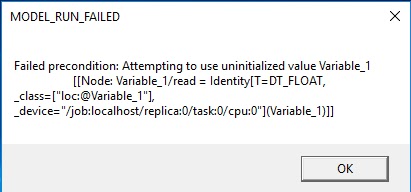
The fact is it seems the variable didn't get initialized if we explicitly do it in the program:


I am still working on it, but log it here in reminding someone who's applying TensorFlow to the scenario that requires no explicit input, please rethink about it.


Thursday, November 10, 2016

Handwritten digits recognition via TensorFlow based on Windows MFC (V) - Result demo

The final finised project named DigitRecognizer developed under Visual Studio 2015, referring to the following video for an demonstration.


However, still a long way to go to master TensorFlow.

Thanks for the guys at Google for developing TensorFlow, however support of bazel on Windows still need more improvements.

Thanks guys at Microsoft for developing Visual Studio, which always cease the pain for development on Windows.

Thanks guys make and still bread Machine Learning, will always need to learn from you and to show my appreciations.

Happy learning, happy coding!

Handwritten digits recognition via TensorFlow based on Windows MFC (IV) - Load trained model

I think two good article have detailed everything, thanks a lot to their efforts:
https://medium.com/jim-fleming/loading-a-tensorflow-graph-with-the-c-api-4caaff88463f#.t78tjznzu, by Jim Fleming; http://jackytung8085.blogspot.kr/2016/06/loading-tensorflow-graph-with-c-api-by.html by Jacky Tung.

So I directly paste the code here for reference:

MnistModel.cc:

#include<Windows.h>

#include <stdio.h>

#include <vector>
#include <string>
#include <sstream>
#include <iostream>
#include <utility>

#include "tensorflow/core/public/session.h"
#include "tensorflow/core/platform/env.h"

#include "MNistComm.h"

using std::vector;
using std::string;
using std::ostringstream;
using std::endl;
using std::pair;

using namespace tensorflow;

void fillErrMsg(MNIST_COMM_ERROR *err, MNIST_ERROR_CODE c, Status& status)
{
    memset(err, 0, sizeof(MNIST_COMM_ERROR));
        
    err->err = c;
        
    ostringstream ost;
    ost << status.ToString() << endl;
        
    snprintf(err->msg, MAX_MSG_SIZ, "%s", ost.str().c_str());
}

// Windows are Unicode supportted, so everything is natively Unicode
int wmain(wchar_t* argc, wchar_t* argv[])
{    
    // Open file mapping object
    MnistShm mnistShm(false);
    if (!mnistShm)
        return MNIST_OPEN_SHM_FAILED;        
   
    MnistEvent mnistEvent(false);
    if (!mnistEvent)
        return MNIST_OPEN_EVT_FAILED;

    Session* session = NULL;
    Status status = NewSession(SessionOptions(), &session);
    if(!status.ok())
    {
        MNIST_COMM_ERROR err;
        fillErrMsg(&err, MNIST_SESSION_CREATION_FAILED, status);
        mnistShm.SetError(reinterpret_cast<char*>(&err));
        
        return MNIST_SESSION_CREATION_FAILED;
    }
        
    char modelPath[MAX_PATH];
    CMnistComm::WChar2Char(modelPath, argv[1], MAX_PATH - 1);
    
    GraphDef graph_def;    
    status = ReadBinaryProto(Env::Default(), modelPath, &graph_def);
    if (!status.ok())
    {        
        MNIST_COMM_ERROR err;
        fillErrMsg(&err, MNIST_MODEL_LOAD_FAILED, status);
        mnistShm.SetError(reinterpret_cast<char*>(&err));

        return MNIST_MODEL_LOAD_FAILED;
    }
    
    status = session->Create(graph_def);
    if (!status.ok()) {

        MNIST_COMM_ERROR err;
        fillErrMsg(&err, MNIST_GRAPH_CREATION_FAILED, status);
        mnistShm.SetError(reinterpret_cast<char*>(&err));

        return MNIST_GRAPH_CREATION_FAILED;
    }
    
    // Setup inputs and outputs:
    Tensor img(DT_FLOAT, TensorShape({1, MNIST_IMG_DIM}));

    MNIST_COMM_EVENT evt;
    
    while (evt = mnistEvent.WaitForEvent(MNIST_EVENT_PROC))
    {        
        auto buf = img.flat<float>().data();
    
        mnistShm.GetImageData(reinterpret_cast<char*>(buf));

        vector<pair<string, Tensor>> inputs = {
            { "input", img}
        };
        
        // The session will initialize the outputs
        vector<Tensor> outputs;
        // Run the session, evaluating our "logits" operation from the graph
        status = session->Run(inputs, {"recognize"}, {}, &outputs);
        if (!status.ok()) {
            MNIST_COMM_ERROR err;
            fillErrMsg(&err, MNIST_MODEL_RUN_FAILED, status);
            mnistShm.SetError(reinterpret_cast<char*>(&err));
            
            return MNIST_MODEL_RUN_FAILED;
        }
        
        auto weights = outputs[0].shaped<float, 1>({10});
        int index = 0;
        int digit = -1;
        
        float min_ = 0.0;
        for (int i = 0; i < 10; i ++, index ++)
        {
            if (weights(i) > min_)
            {
                min_ = weights(i);
                digit = index;
            }
        }
                
        mnistShm.SetImageLabel(reinterpret_cast<char*>(&digit));
        mnistEvent.NotifyReady();
                
    }

    session->Close();
    
    return 0;
}